> ## Documentation Index
> Fetch the complete documentation index at: https://docs.openmic.ai/llms.txt
> Use this file to discover all available pages before exploring further.
# Pre-Call Webhooks
> Dynamically configure call behavior and inject real-time data before calls begin.
**Dynamic Call Configuration**: Pre-call webhooks allow you to fetch
customer data, account information, and contextual details in real-time
before each call starts.
## Overview
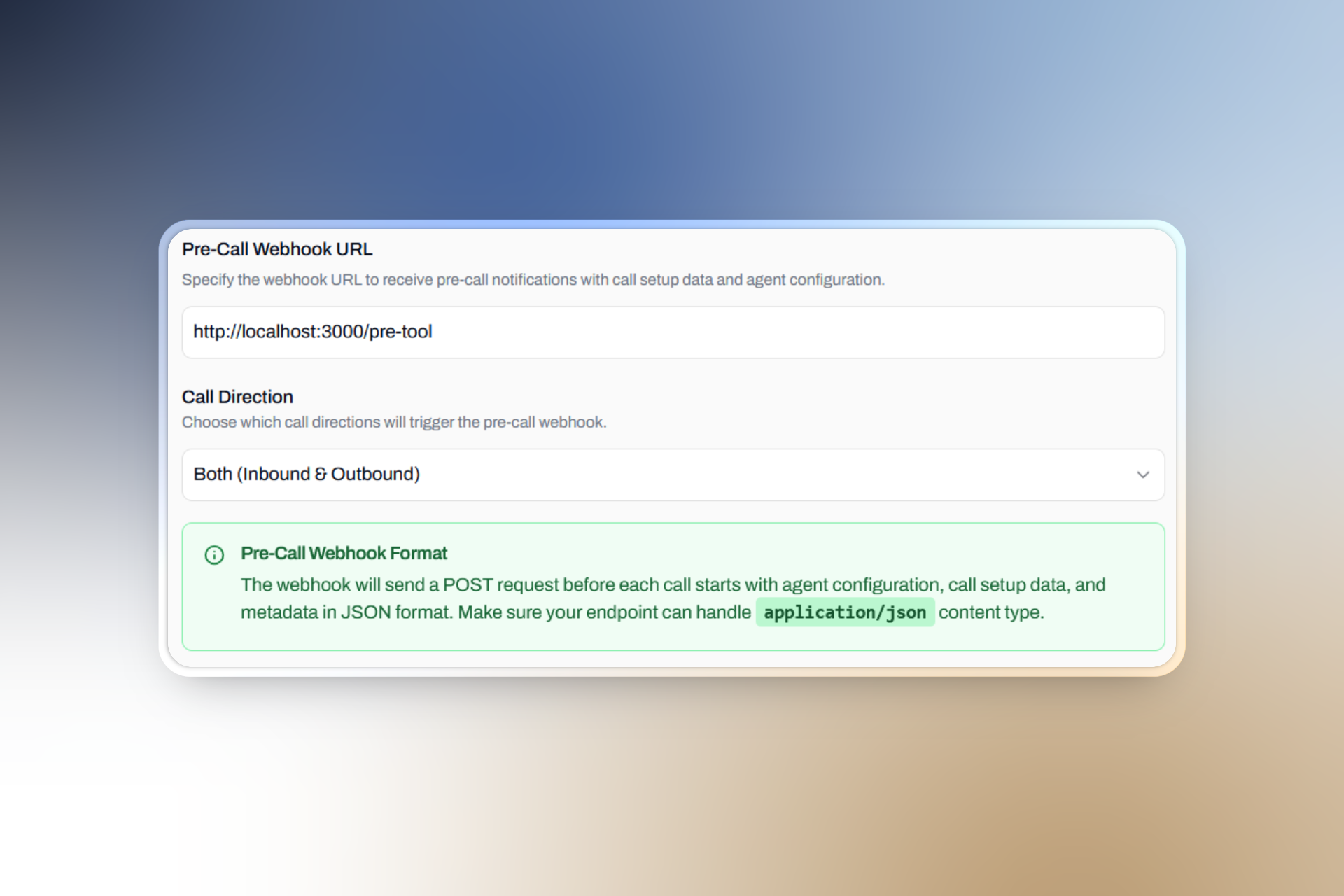 Pre-call webhooks enable bidirectional communication between Openmic and your systems. When a call is about to begin, Openmic sends call details to your webhook endpoint, and your system responds with dynamic variables that customize the call experience.
Fetch customer details, account status, and contextual information from
your systems before the call starts
Use dynamic variables to personalize agent responses and call flows
based on caller information
***
## When Pre-call Webhooks Trigger
Pre-call webhooks respect the `webhook_direction` configuration setting:
Triggered for all inbound and outbound calls
Only triggered for incoming calls to your agents
Only triggered for calls initiated by your agents
If no webhook URL is configured or the webhook direction doesn't match the
call direction, the call proceeds without dynamic variables.
***
## Request Specification
### HTTP Method and Timeout
Openmic sends a `POST` request to your configured webhook URL with:
* **Content-Type**: `application/json`
* **Timeout**: 3 seconds per attempt
* **User-Agent**: `Openmic-Webhook/1.0`
If all webhook attempts fail, the call will end. Please read [failure handling](#failure-handling) for more info.
### Request Payload
```json theme={null}
{
"event": "call",
"call": {
"direction": "outbound",
"bot_id": "cmdx5w8oc0005q671s3cbg063",
"from_number": "+16167948654",
"to_number": "+916297653534",
"attempt": "2"
}
}
```
### Payload Fields
| Field | Type | Required | Description |
| ------------------ | ------ | -------- | ------------------------------------------- |
| `event` | string | Yes | Always `"call"` for pre-call webhooks |
| `call.direction` | string | Yes | Call direction: `"inbound"` or `"outbound"` |
| `call.bot_id` | string | Yes | Unique identifier for the bot/session |
| `call.from_number` | string | Yes | Caller's phone number in E.164 format |
| `call.to_number` | string | Yes | Callee's phone number in E.164 format |
| `call.attempt` | string | Yes | Attempt number of the webhook |
***
## Expected Response
### Success Response
Your webhook must return a `200` status code with a JSON response containing dynamic variables:
```json theme={null}
{
"call": {
"customer_id": "cus_001",
"dynamic_variables": {
"customer_name": "John Doe",
"account_balance": "1,250.50",
"subscription_status": "premium",
"last_purchase_date": "2024-07-15",
"support_tier": "gold",
"preferred_language": "english"
}
}
}
```
### Response Structure
| Field | Type | Required | Description |
| ------------------------ | ------ | -------- | ----------------------------------------------------------- |
| `call` | object | Yes | Container for call-related data |
| `call.customer_id` | string | No | Unique identifier for the customer associated with the call |
| `call.dynamic_variables` | object | Yes | Key-value pairs of variables to inject into the call |
**Variable Usage**: Dynamic variables can be referenced in your agent
prompts using template syntax like `{{ customer_name }}`, `{{ email }}`, etc.
**Customer ID Tracking**: When you provide a `customer_id` in the webhook response, you can later use the [List Calls API](/api-reference/calls/list-calls#parameter-customer-id) to filter and retrieve all calls associated with that customer ID using the `customer_id` query parameter.
***
## Retry Logic and Error Handling
### Retry Configuration
**3 total attempts** 1 initial request + 2 retries
**3 seconds** Per individual request attempt
**Exponential delays** 1s, 2s, 3s between retries
### Retry Triggers
Openmic retries your webhook in these scenarios:
* **Timeout**: No response within 3 seconds
* **HTTP Errors**: 4xx or 5xx status codes
* **Network Errors**: Connection failures or DNS resolution issues
* **Invalid JSON**: Malformed response body
### Failure Handling
If all webhook attempts fail, the call will terminate.
To avoid an incomplete or awkward conversation caused by missing dynamic variables, the default behavior is to end the call after all retry attempts are exhausted.
If you want the call to proceed even after repeated webhook failures, implement the following safeguard:
* Track the `"attempt"` field included in each webhook request payload.
* On the **third attempt** (final retry), return an **empty JSON object** for the dynamic variables.
Example response to allow the call to continue without injected variables:
```json theme={null}
{
"call": {
"dynamic_variables": {}
}
}
```
When using this approach, ensure your agent prompts handle missing variables gracefully.
***
## Examples
```js theme={null}
// Example CRM lookup function
async function getCustomerData(phoneNumber) {
// Pretend we're calling an internal CRM API or DB
return {
customer_name: 'Alice Chen',
account_balance: '3452.75',
};
}
app.post('webhook/pre-call', async (req, res) => {
const { call } = req.body;
console.log('📞 Pre-call webhook received:', call);
try {
// Pull customer data based on from_number
const customerData = await getCustomerData(call.from_number);
// Return dynamic variables in correct format
res.json({
call: {
customer_id: customerData.customer_id || "cus_001",
dynamic_variables: customerData
}
});
} catch (err) {
console.error('❌ Failed to fetch customer data', err);
// If this is the 3rd attempt, return empty variables to allow call
if (parseInt(call.attempt, 10) === 3) {
return res.json({
call: {
dynamic_variables: {}
}
});
}
// Any other attempt = fail (will trigger retry)
res.status(500).json({ error: 'Failed to fetch call data' });
}
});
```
***
## Testing and Debugging
**Possible causes:**
* Webhook URL not configured
* `webhook_direction` doesn't match call direction
* Invalid webhook URL format
**Solutions:**
* Verify webhook URL in dashboard
* Check `webhook_direction` setting
* Ensure URL uses HTTPS and is publicly accessible
**Possible causes:**
* Slow database queries
* External API dependencies
* Heavy processing logic
**Solutions:**
* Optimize database queries with indexes
* Cache frequently accessed data
* Use asynchronous processing for heavy operations
* Set shorter timeouts for external API calls
**Possible causes:**
* Incorrect response format
* HTTP status code other than 200
* Variables not referenced in agent prompts
**Solutions:**
* Validate JSON response structure
* Ensure 200 status code response
* Check agent prompt syntax for variable references
Pre-call webhooks enable bidirectional communication between Openmic and your systems. When a call is about to begin, Openmic sends call details to your webhook endpoint, and your system responds with dynamic variables that customize the call experience.
Fetch customer details, account status, and contextual information from
your systems before the call starts
Use dynamic variables to personalize agent responses and call flows
based on caller information
***
## When Pre-call Webhooks Trigger
Pre-call webhooks respect the `webhook_direction` configuration setting:
Triggered for all inbound and outbound calls
Only triggered for incoming calls to your agents
Only triggered for calls initiated by your agents
If no webhook URL is configured or the webhook direction doesn't match the
call direction, the call proceeds without dynamic variables.
***
## Request Specification
### HTTP Method and Timeout
Openmic sends a `POST` request to your configured webhook URL with:
* **Content-Type**: `application/json`
* **Timeout**: 3 seconds per attempt
* **User-Agent**: `Openmic-Webhook/1.0`
If all webhook attempts fail, the call will end. Please read [failure handling](#failure-handling) for more info.
### Request Payload
```json theme={null}
{
"event": "call",
"call": {
"direction": "outbound",
"bot_id": "cmdx5w8oc0005q671s3cbg063",
"from_number": "+16167948654",
"to_number": "+916297653534",
"attempt": "2"
}
}
```
### Payload Fields
| Field | Type | Required | Description |
| ------------------ | ------ | -------- | ------------------------------------------- |
| `event` | string | Yes | Always `"call"` for pre-call webhooks |
| `call.direction` | string | Yes | Call direction: `"inbound"` or `"outbound"` |
| `call.bot_id` | string | Yes | Unique identifier for the bot/session |
| `call.from_number` | string | Yes | Caller's phone number in E.164 format |
| `call.to_number` | string | Yes | Callee's phone number in E.164 format |
| `call.attempt` | string | Yes | Attempt number of the webhook |
***
## Expected Response
### Success Response
Your webhook must return a `200` status code with a JSON response containing dynamic variables:
```json theme={null}
{
"call": {
"customer_id": "cus_001",
"dynamic_variables": {
"customer_name": "John Doe",
"account_balance": "1,250.50",
"subscription_status": "premium",
"last_purchase_date": "2024-07-15",
"support_tier": "gold",
"preferred_language": "english"
}
}
}
```
### Response Structure
| Field | Type | Required | Description |
| ------------------------ | ------ | -------- | ----------------------------------------------------------- |
| `call` | object | Yes | Container for call-related data |
| `call.customer_id` | string | No | Unique identifier for the customer associated with the call |
| `call.dynamic_variables` | object | Yes | Key-value pairs of variables to inject into the call |
**Variable Usage**: Dynamic variables can be referenced in your agent
prompts using template syntax like `{{ customer_name }}`, `{{ email }}`, etc.
**Customer ID Tracking**: When you provide a `customer_id` in the webhook response, you can later use the [List Calls API](/api-reference/calls/list-calls#parameter-customer-id) to filter and retrieve all calls associated with that customer ID using the `customer_id` query parameter.
***
## Retry Logic and Error Handling
### Retry Configuration
**3 total attempts** 1 initial request + 2 retries
**3 seconds** Per individual request attempt
**Exponential delays** 1s, 2s, 3s between retries
### Retry Triggers
Openmic retries your webhook in these scenarios:
* **Timeout**: No response within 3 seconds
* **HTTP Errors**: 4xx or 5xx status codes
* **Network Errors**: Connection failures or DNS resolution issues
* **Invalid JSON**: Malformed response body
### Failure Handling
If all webhook attempts fail, the call will terminate.
To avoid an incomplete or awkward conversation caused by missing dynamic variables, the default behavior is to end the call after all retry attempts are exhausted.
If you want the call to proceed even after repeated webhook failures, implement the following safeguard:
* Track the `"attempt"` field included in each webhook request payload.
* On the **third attempt** (final retry), return an **empty JSON object** for the dynamic variables.
Example response to allow the call to continue without injected variables:
```json theme={null}
{
"call": {
"dynamic_variables": {}
}
}
```
When using this approach, ensure your agent prompts handle missing variables gracefully.
***
## Examples
```js theme={null}
// Example CRM lookup function
async function getCustomerData(phoneNumber) {
// Pretend we're calling an internal CRM API or DB
return {
customer_name: 'Alice Chen',
account_balance: '3452.75',
};
}
app.post('webhook/pre-call', async (req, res) => {
const { call } = req.body;
console.log('📞 Pre-call webhook received:', call);
try {
// Pull customer data based on from_number
const customerData = await getCustomerData(call.from_number);
// Return dynamic variables in correct format
res.json({
call: {
customer_id: customerData.customer_id || "cus_001",
dynamic_variables: customerData
}
});
} catch (err) {
console.error('❌ Failed to fetch customer data', err);
// If this is the 3rd attempt, return empty variables to allow call
if (parseInt(call.attempt, 10) === 3) {
return res.json({
call: {
dynamic_variables: {}
}
});
}
// Any other attempt = fail (will trigger retry)
res.status(500).json({ error: 'Failed to fetch call data' });
}
});
```
***
## Testing and Debugging
**Possible causes:**
* Webhook URL not configured
* `webhook_direction` doesn't match call direction
* Invalid webhook URL format
**Solutions:**
* Verify webhook URL in dashboard
* Check `webhook_direction` setting
* Ensure URL uses HTTPS and is publicly accessible
**Possible causes:**
* Slow database queries
* External API dependencies
* Heavy processing logic
**Solutions:**
* Optimize database queries with indexes
* Cache frequently accessed data
* Use asynchronous processing for heavy operations
* Set shorter timeouts for external API calls
**Possible causes:**
* Incorrect response format
* HTTP status code other than 200
* Variables not referenced in agent prompts
**Solutions:**
* Validate JSON response structure
* Ensure 200 status code response
* Check agent prompt syntax for variable references